Showing posts with label technical. Show all posts

Tuesday, March 1, 2011

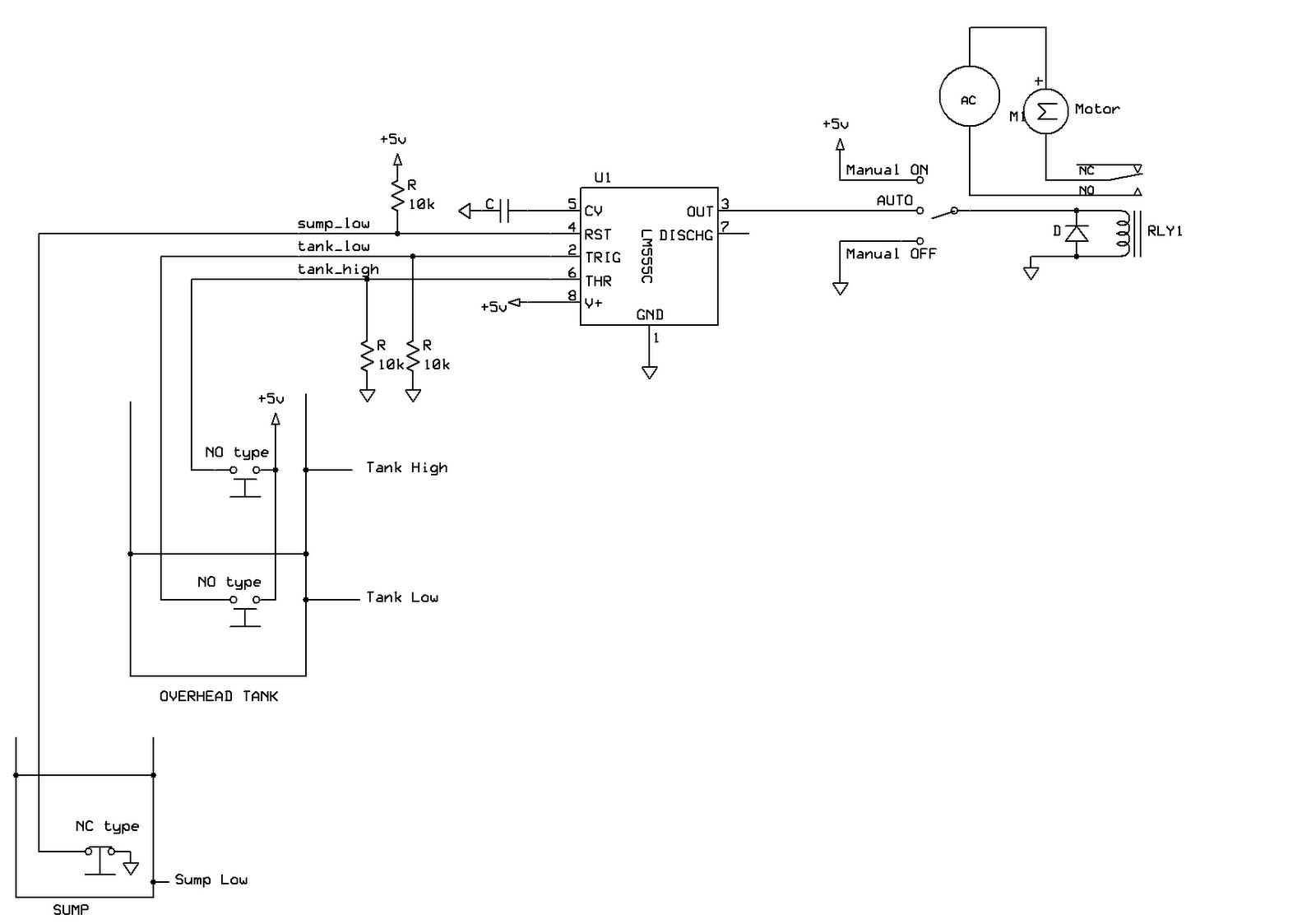
555 timer based water level controller


There is a sump in ground floor where water is stored and an over head tank from where water is supplied to the entire building. A motor is used to pump the water from sump to overhead tank whenever water in the tank is 'empty'. The motor is switched OFF once the overhead tank is 'full'. If the sump is 'empty' motor should not be turned ON as it causes 'dry run' of the motor. Manually monitoring the above conditions to operate the motor could be painstaking. Hence an automatic controller system is built to switch the motor ON and OFF as per the conditions above. The controller also provides a 'manual' mode to operate the motor manually.

A simple, single chip (555 timer) circuit can automate the operation. Such a 'controller system' will need following:
  1. Sensors which can detect the water levels in tank and sump.
  2. An electronic circuit (herein referred to as controller) which turns the motor ON and OFF based on the sensor information.

Two types of sensors are used for this system:

  • NO(Normally Open) sensor - opens the circuit when water is below the sensor level and closes the circuit when water is above the sensor level.
  • NC (Normally Closed) sensor - closes the circuit when water is below the sensor level and opens the circuit when water is above the sensor level.

Two types of sensors are used to avoid a NOT logic that will be otherwise required in the circuit. The details of the sensors are provided at the end of this blog.

Controller requires following 3 sensors to be installed:

  1. tank_low: This is a ‘NO’ type sensor installed at a lower height in the tank to detect the 'empty' level of the tank. This sensor is connected to Pin 2 of 555 timer. When water in overhead tank falls below this sensor, the sensor circuit is 'open' and motor is turned ON. (Refer to controller circuit diagram).
  2. tank_high: This is also a ‘NO’ type sensor installed at an higher level in the tank to detect the 'full' condition. This sensor is connected to Pin 6 of 555 timer. When water in overhead tank reaches above this sensor, the sensor circuit is 'closed' and motor is turned OFF.
  3. sump_low: This is a ‘NC’ type sensor installed at a lower height in the sump to detect the 'dry run' condition. This sensor is connected to Pin 4 of 555 timer. When water in the sump falls below this sensor, the sensor circuit is 'closed' and motor is turned OFF. Since this sensor is connected to the Reset pin (Pin-4) of 555 timer, the motor is turned OFF when water is below this sensor irrespective of the water level in the tank. Only when water is above this sensor, 555 timer is out of reset and hence will respond to the information from tank sensors.

Advantages of this controller system:

  • Single chip (555 timer and some resistors are required) solution and hence low maintenance.
  • Inexpensive as both the sensors and the controller circuit is built with inexpensive parts.
  • The circuit can be powered by the AC mains (using a 5V DC adaptor). When AC power is off, circuit is also switched off and no current is drawn to un-necessarily latch the electro mechanical relay
  • The operation of sensors is independent of conductivity of the liquid (here water). Hence this system can be used for any liquid level controller systems

Sensor mechanim:
Sensor is made up of a wooden base, which can float on water and two sensor leads that are connected to controller circuit. A metal strip is attached to wooden base as shown in pictures below. In 'NO' type sensors, when water is below the sensor level, wooden base floats below the sensor leads and hence the sensor circuit is open. When water level reaches or crosses sensor level, wooden base floats and touches the sensor leads closing the sensor circuit. In 'NC' type sensor, wooden base is mounted above the sensor leads as shown in the pictures below and hence the operation is reversed with respect to 'NO' type.


Friday, May 8, 2009

Retreiving lost e-mail contacts

Last month I faced some trouble with my yahoo webmail account. There was a virus attack in my mail box and it sent some random product promotional mail to all the contacts in my contact list. This was lesser of the problem as I only had to send a follow up mail cautioning every one in my contact list about the virus attack. But after a week or so, all my contacts were deleted from my contact list! I had never backed up my contacts and hence this was a jolt to me. However, I was lucky to find a copy of the mail sent by the virus in my sent items folder. This mail had all my contacts in the 'To' list. There were well beyond a 100 contacts which I had to manually enter in my address book. Yahoo supports contact imports only from specific formats like .csv etc. The problem was to enter the contacts from the sent mail to .csv file so that all the contacts can be imported at one shot. So I used the following trick:

1. I copy-pasted everthing under 'To' list to a text file. This will have one long line of all the contact names, there mail ids with < > and separated by a comma
2. Opened this text file in Textpad, a very useful text editor.
3. I had to get all the contacts in vertical order in a column format to be copied into a .csv file. So I recorded a macro in Textpad to search for comma and replace it with Enter key. Now I played the macro until all the contacts moved into new lines. This resulted in vertical (column aligned) ordering of my contacts. (Note that you can not use Find/Replace function to replace any character with new line!)
4. Some slight adjustments had to be done for which I copied this ordered contacts into a Microsoft excel and used 'Text to columns' function to achieve them same.
5. Exported my contacts from yahoo as .csv which gave a blank csv file as all the contacts were deleted. Copied the ordered contacts into this .csv file and imported into yahoo contacts. Boom!!! My contacts were back :)

Line following robo... mooshik

Though it has been 3+ years since I have passed out of the college, the hang over still continues. I was very enthusiastic about building circuits and participating in various hardware contests in the college. One visit to techfest at IIT-B in my 3rd year engg, changed my perception of these hardware contests. I was particularly fascinated by the robotics - maze solver. After that I tried to build a robo in my college but didn't succeed. The opportunity came last month when we organized a techfest in Ittiam (the organization I work at). I teamed up with my colleague Anil Ram who shares similar interests and in fact had successfully build a robo in college days. After spending few weekends on it we finally could build Mooshik - the line following robo. Video below

Saturday, January 24, 2009

Twitter v/s blogging

I have been twittering a lot recently and that has taken a toll on my blogging. I twitter a lot now and blog a lot less. This blog is about twitter so as to create a harmony between twitter and my blogging :)

What is twitter?
Twitter is a concept of micro-blogging where you need to answer 1 simple question - 'what are you doing now?' how many ever number of times you want. But only one constraint - your text has to be limited to 140 characters (each alphabet, number or punctuation is a character) per post, hence the name micro blogging.

How is answering a question related to blogging?
Though twitter expects you to answer just 'what are you doing now?', people have started posting anything and everything to that question. Sometimes I just post a T-shirt quote that catches my attention at a traffic signal. There are few news agencies which post news highlights as and when they get to know about it. So its fast growing as blogging where people instantly post their views.

How do I micro-blog?

Simple. Create an account at twitter.com. You can now start 'post'ing or sending your posts to your account via various channels -
1. Internet: Login to your account and post a message just like your blog
2. SMS : Register your mobile number with twitter.com and associate it with your account. Whenever you send a text message from your mobile to twitter number, the text message is immediately posted on your account
3. Internet: There are various websites, widgets, iPhone applications etc which provide you alternate ways of posting to your account.

'Twitter' has become synonymous to micro-blogging and also since its quicker to pronounce twitter than micro-blogging, 'twitter' is being used as a verb for posting. All the posts to twitter.com are also referred to as 'twitter-feeds' (similar to RSS feeds), 'tweets' and so on. I guess english is getting richer every day with new words :)

How does my friends read my micro-blog?
Just like any other blog, you can share an url of your micro blog that your friends can visit to see all your posts till date. For example, my twitter url is http://twitter.com/ranjith_ka (or www.ranjithka.com/twitter) Alternately, your friends can also create an account with twitter and start 'following' your twitter posts. Similarly, you can also follow anyone's tweets. The tweets of all your friends you are following will be displayed in a consolidated, chronologically ordered list for your reference. So you dont have to really visit all your friends' twitter pages to see their posts. This is very similar to RSS, and hence called Twitter-feeds.

140 characters are too less to express myself.
You can post a text larger than 140 characters but it will be posted as separate posts each of maximum length 140 characters. Its exactly similar to the SMS on your mobile phone with certain character limit.
Believe me, ever since I have started twittering, my communication has improved and I am able to express most of my views in less than 140 characters. Twitter helps you in refining your communication skills :)

What if I want to post more than text?
Twitter allows you to do lot more than posting text. You can upload a picture for your profile. You can also upload any pictures on twitpic.com and give a link to those pics in your tweets. Also if you ever want to share a really long hyper-link in twitter, you can create a 'tiny url' out of the hyper-link which is actually a compressed version of the really long link and share it in twitter so that you have space to accomodate in 140 characters.

Is there any other cool stuff I can do with twitter?
Yes. There are already a lot of widgets, applications on mobile phones developed for twitter with which you can do a lot of cool stuff. If you are a geek and want to do something on your own, twitter has provided an API with which you can build applications. This API is free of cost unlike the iPhone SDK.

Which is better - twittering or blogging?
I haven't yet figured that out. I might very well never be able pick one of them over the other. But I will list certain advantages and disadvantages of twitter compared to blogging.

Advantages of twitter:
1. Its instantaneous and you need less time to post
2. Since the character limit is well within SMS limit, you can just SMS to twitter
3. Lot of your friends will go through your twitter messages than blogging because its quicker to go through smaller posts (notice the length of this article :))
4. You can choose to get twitter updates from your friends as SMS to your mobile. So you'll always be updated about whereabouts of your friends, what they are doing, eating, thinking etc (ofcourse, provided they twitter :))
5. It can be a really good travelogue
6. Can be your online diary which you can update many times a day with small pieces of info instead of a consolidated post before you go to sleep

Disadvantages:
1. You can not provide a lot of information in tweets. For example I can not post an article like this in tweets
2. I can nott write a nice travelogue with accompanied photos on a single page
3. You will get addicted to twitter very quickly :)

Some tips:
In India, where public WiFi is still a dream and internet on mobile phone is expensive, the best way to twitter is through SMS. But SMS to twitter number in india (5566595) will be charged Rs. 3 per SMS. There are some websites which give you an alternate number to which you can post tweets. They in turn post those tweets to your twitter account using the twitter API. However, you need to share your twitter account details with them so that they can post to your account. So be careful. I have an account with www.vakow.com which gives me a local number to send SMS to.


Follow me at www.ranjithka.com/twitter. Happy twittering.

Monday, April 21, 2008

iPhone

Disclaimer : This is not another iPhone blog where you can keep track of the latest developments on iPhone hacks. This blog is in response to a lot of queries that I have recieved from my friends ever since i bought the iphone. If you are new to iPhone or if you don't have enough time to search the web and collate the basic details then this blog is ideal for you. If you are already a vivid follower of iPhone developments, then the details here will look as old as 10000 bc :) - in which case I would recommend you to skip this blog. I am not even planning to update this article but will point to some useful resources at the end of this article for the latest updates.

For the in uninitiated, iPhone is 'ipod+Internet device + mobile phone'
from apple as described by Steve jobs...

All the following details are true as on April 23rd of 2008...

Where to buy?
iPhone is available only in USA and in some European countries. Though the launch of iphone in India and Asia is rumored to be very soon, Apple has kept it secret in its typical style.

Price?
In US, 8GB version costs around USD400 and 16GB version costs around USD 500. 7-10% tax is applicable depending on the region of purchase. You can purchase it either in Apple store or AT&T stores. You can even place an order online on Apple online store but will be shipped only to an US address. I got a 8 GB version last September through my coleague at Ittiam and I am lovin' it ... (I hope McDonald's won't sue me for this :)) Price is slightly higher if you buy it from Europe. Check the Europian prices here...

How to get it working?
Iphone is sim-locked with the carrier partner of Apple in the repective countries where it is officially launched (unfortunately it is not yet launched in India/Asia yet). As a result you won't be unable to use it without unlocking it. You need to unlock your iphone before being able to use any GSM sim( Airtel, Vodafone, Spice - are all gsm services). I use Vodafone sim on iPhone.

You will come across a lot of jargons like - jailbreak, unlocking, virginize, bricking etc on the web. Don't bother if it sounds alien. Hacking community has worked hard to make things as simple as possible for you. You can unlock the iPhone in 4 minutes flat (yes its just twice as long as preparing 2 minutes maggi :) ) the best part is the software for this is available free of cost for download.

ZiPhone is an unlocking software that does everthing (jailbreak, unlocking, installing installer.app for your iPhone) required to be able to use any GSM sim. It can't get simpler than using this software to unlock iPhone. It's a single-click-wait-for-4-mins-until-the-'completed'-message-is-displayed solution for unlocking. And the best part of it is you can do it all by yourself without any fuss. However you'll lose the 1 yr warranty from Apple as soon as you unlock it.

What's the big deal if I lose warranty?
Basically, nobody will service your mobile if hardware fails - no replacement of battery etc - you are completely on your own. But don't panic - you need to be a little disciplined in using it. I have added few tips for iPhone maintenance at the end. If you are still apprehensive about unlocking on your own, you can buy one from one of those gray markets at a 3-5k premium. I have even heard that few of them provide you some additional service in case you manage to spoil anything. All said and done - as I said earlier you are on your own and nobody to be blamed once you unlock it.

Pros of iPhone
Multi touch touchscreen
Amazing UI - User Interface experience . I bet, you can't get better than this
A lot of 3rd party softwares are available free of cost
Huge screen
Amazing Internet based applications
High resolution camera - 2 MP. (Don't equate this with other 2 MP cameras. The photos taken by iPhone camera are much better even when viewed on a PC compared to other 2 MP cameras)
8GB and 16GB is quite a memory
Very good display quality
Value for money @17k INR for 8GB 16 GB costs around 22k INR
A sure attention grabber :)

Check out this demo tour video on Apple site.

Cons of iPhone
Not launched officially in India
Warranty is void as soon as it is unlocked
No service provided in India.
No video recording
No copy-paste
No optical zoom
No digital zoom
Can't share files - songs/videos/photos/contacts through Bluetooth
Can't forward an SMS
Can't use iPhone as a portable USB drive
Only way to transfer files is - syncing through iTunes (software provided by Apple)
Can't sync from different PCs (this is the most painful. You can
transfer files only from one PC!)
Even if you manage to sync from a single PC every time, there is a problem. If some file is missing on your PC but is avialable on your iPhone the file gets deleted from iphone when you sync with the PC !!!
The loud speaker is not really that loud
No FM (A hardware limitation)
No support for office files - doc, xl or ppt. You can only read them if you receive them as attachments in your mail.
Not a very great organizer
Internet connectivity is only through WiFi or EDGE. No GPRS

All the software limitations above are in the default iPhone software.
Most of them are already resolved by 3rd party applications. Few of
them can be expected to be updated by Apple itself in future
software/firmware updates.

Tips for maintenance
- You have option to recharge the battery through USB or direct AC. Avoid charging through direct AC whenever possible, as voltage flucuations might damage your battery.Use only USB mode of charging.
- In cases where you have to charge it through direct power use a voltage stabilizer. I might sound a little wierd here but I follow this whenever I go to my hometown where I don't have access to a PC. It will save your dear iPhone.
- Don't upgrade to new firmware releases from Apple unless you find out that it can be unlocked.

Overall experience
I would rate it 9/10. ( I know this number doesn't make any sense as my rating is not benchmarked:) but still it gives you a feel for it) Watch the demo video

Useful resources
iphone hack blog: http://iphone.unlock.no/
iPhone hack site
Apple site

Lot of videos on Youtube
and....
My blog :) - just kidding - don't expect me to update this article any further